Quick Start
Getting Started
Getting started is simple, even if you are new.
Begin by creating a campaign and giving it a name. Add a small list of people and assign a few team members. Once you start, the system will guide everything automatically.
Basic steps:
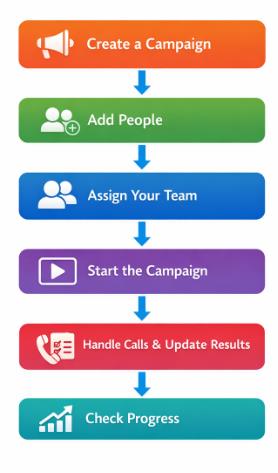
Example: Campaign Flow in a Real Scenario
Let’s say your company wants to promote a new product to existing customers. Instead of calling people randomly, you use the Campaign Module to manage everything step by step.
Step 1: Create a Campaign
You create a campaign called “New Product Promotion” to organize this activity.
Step 2: Add People
You add a list of customers who might be interested in the new product.
Step 3: Assign Your Team
You select your sales team members who will make the calls.
Step 4: Start the Campaign
You start the campaign, and the system begins giving calls to your team automatically.
Step 5: Handle Calls & Update Results
Your team members:
- Talk to customers
- Explain the product
- Mark the result (interested, not interested, call later)
Step 6: Check Progress
You can now see:
- How many customers were contacted
- How many are interested
- How your team is performing