Disposition & Follow-up Handling Guide
1. Introduction
The Disposition Module is used to record the outcome of each call during a campaign.
It ensures all call results are captured in a structured way and helps in tracking, reporting, and follow-ups.
Follow-up handling allows scheduling future actions for leads based on call outcomes.
2. Module Overview
- Disposition Module is enabled by default with the Campaign module
- Integrated with CRM for storing outcomes
- Fields can be configured based on requirements
- Module cannot be deleted
3. Disposition Configuration in Campaign
During Campaign Creation
- Option available to enable or disable Disposition
- If enabled:
- Disposition template is applied to campaign leads
Disposition Template
- Pre-configured template can be selected
- Template supports:
- Campaign fields
- Lead fields
- Custom fields
Example Fields
- Call Outcome (Connected, Not Connected, etc.)
- Notes
- Follow-up details
4. Disposition Handling During Campaign
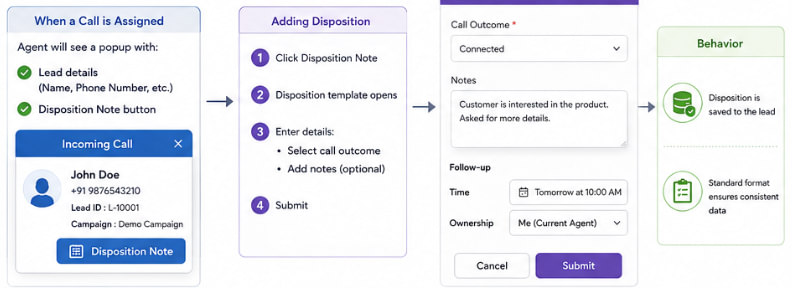
When a Call is Assigned
Agent will see a popup with:
- Lead details (Name, Phone Number, etc.)
- Disposition Note button
Adding Disposition
- Click Disposition Note
- Disposition template opens
- Enter details:
- Select call outcome
- Add notes (optional)
- Submit
Behavior
- Disposition is saved to the lead
- Standard format ensures consistent data
5. Multiple Dispositions
- Multiple dispositions can be added for the same lead
- Supported scenarios:
- Retry attempts
- Multiple call interactions
- Manual updates after campaign
6. Agent Status Behavior
After Disposition Submission
- Agent status automatically changes back to previous status
- Agent becomes ready to receive next campaign call
7. Follow-up Handling
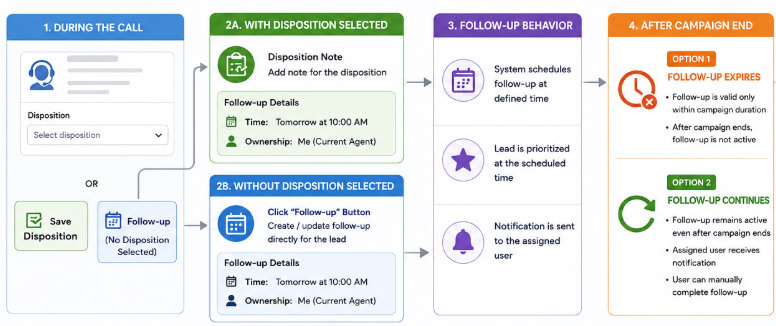
Follow-up is part of the Disposition Note.
If a disposition is selected for the lead, follow-up can be configured within the disposition.
If no disposition is selected, the system will still display a separate Follow-up button, allowing the agent to create or update a follow-up directly for the lead if needed.
Follow-up Fields
Agent can define:
-
Timejp When the next call should happen
-
Ownership
- Me (current agent)
- Team (campaign group)
- Specific agent
Example
- Follow-up Time: Tomorrow at 10:00 AM
- Ownership: Assigned to current agent
8. Follow-up Behavior
- System schedules follow-up based on defined time
- Lead is prioritized at the scheduled time
- Notification is sent to assigned user
- Follow-up can be updated either through the disposition note or through the separate follow-up option when no disposition is selected
9. Follow-up After Campaign End
Two Possible Behaviors
Option 1: Follow-up Expires
- Follow-up is valid only within campaign duration
- After campaign ends, follow-up is not active
Option 2: Follow-up Continues
- Follow-up remains active even after campaign ends
- Assigned user receives notification
- User can manually complete follow-up