User Status Management
User Status Management in Uniconnect AI plays a critical role in improving operational efficiency and workforce productivity within customer engagement environments.
By tracking real-time user availability, organizations can:
- Gain clear visibility into agent availability and workload distribution
- Improve resource allocation during peak and off-peak hours
- Reduce response delays by identifying active and available users instantly
- Enable accurate productivity measurement through status-based activity tracking
Common statuses such as Active, Idle, On Break, and Offline help supervisors understand workforce engagement at any given time, ensuring better operational control and service quality.
Changing User Status in Uniconnect AI Web & Edge
Users can update their status from both Uniconnect AI Web and Uniconnect AI Edge – Unified Agent Desktop.
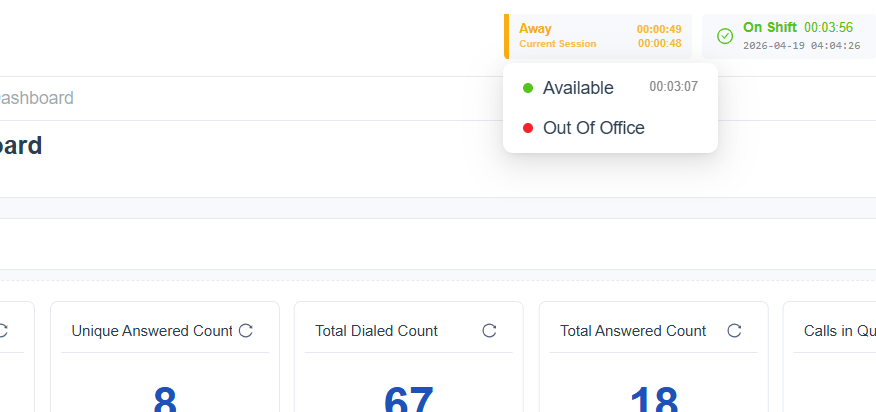
Uniconnect AI Web:
- Log in to Uniconnect AI via your browser
- Locate the Status Indicator (e.g., Available/Away)
- Click on the current status
- Select the desired status from the dropdown list
Uniconnect AI Edge:
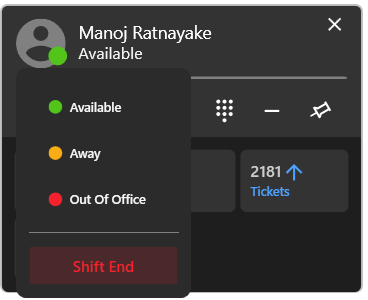
- Launch Uniconnect AI Edge and log in
- Navigate to the Status Panel in the main interface
- Click on your current status
- Choose the required status from the available options
Status updates are reflected in real time across the system.
Status Synchronization with External Systems
Uniconnect AI supports integration with external platforms such as telephony systems (Ex. 3CX) and communication channels (voice, chat, social media, etc.).
Synchronizing user status with these systems is important because it:
- Ensures consistent agent availability across all platforms
- Prevents routing interactions to unavailable users
- Improves customer experience by reducing wait times
- Enables accurate omnichannel workload distribution
- Aligns operational status across Uniconnect AI and external tools (e.g., 3CX or other telephony systems)
For example, if an agent is marked as On Break in Uniconnect AI, the same status is reflected in the telephony system to prevent incoming call routing.
To enable Presence status synchronization between Uniconnect AI and the telephony platform, the Telephony Add-on must be enabled and properly configured. For detailed setup instructions, refer to the Telephony Configuration documentation.
Creating and Configuring Status Types in Uniconnect AI
Administrators can define and manage custom status types within the Uniconnect AI system.
Steps to Create a Status Type:
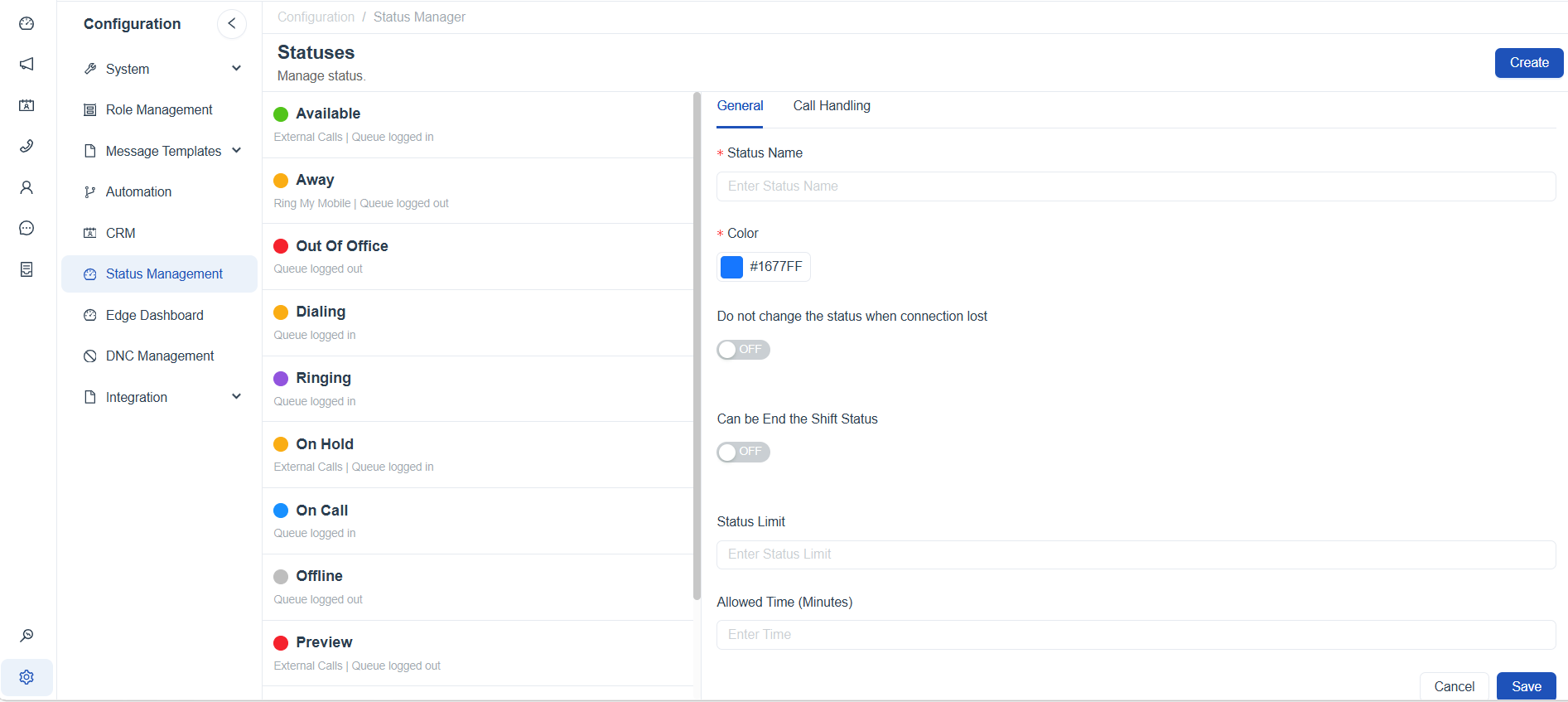
- Navigate to Configuration > Status Management
- Click Create
- Enter the Status Name, then configure the remaining parameters to define the behavior of the custom status.
- Save the configuration
Configuration Options:
Uniconnect AI status configuration is divided into two main sections:
- General – Controls system-wide behavior and tracks user activity for occupancy insights.
| Parameter | Description |
|---|---|
| Shift Name | Define a name for the custom status. It is recommended to keep the name simple and concise so users can easily understand it, and to improve clarity in reports and dashboards. |
| Color | Assign a color to the status. It is recommended to use a unique color for each status to clearly differentiate it from others and avoid confusion. |
| Do Not Change Status When Connection Lost | Enable this option to retain the user's last active status if the system connection is lost. If disabled, the status will automatically change to Offline when the connection is lost. |
| Can End the Shift Status | Enable this option to allow users to end their shift while in this status. |
| Status Limit | Defines how many times a user can use this status within a single work shift. |
| Allowed Time (Minutes) | Specifies the maximum duration a user can remain in this status. If exceeded, overage time tracking will begin. |
- Call Handling – Controls telephony-related behavior when integrated with a telephony platform.
| Parameter | Description |
|---|---|
| Ring My Mobile | When enabled, the user’s mobile phone will ring simultaneously with incoming calls while this status is active. |
| Queue Login | Automatically logs the user into assigned call queues when switching to this status. |
| Enable External Calls | Allows the user to receive and handle external calls while in this status. |
Call Handling–related status parameters depend on the configured telephony platform and may vary between systems (e.g., 3CX vs. FreePBX).This ensures that statuses are not only descriptive but also functionally integrated across systems.
Status Transition Behavior During Active System Statuses
To ensure smooth workflow handling and prevent disruptions during ongoing system activities, Uniconnect AI introduces a controlled status transition mechanism when users attempt to change their status while engaged in system-driven states (e.g., active calls, tasks, or interactions).
Status Selection Behavior
- Agents can select a new status at any time, even while engaged in an active system action
- The newly selected status does not immediately replace the current status
- This prevents interruption of ongoing tasks and ensures operational consistency
Upcoming Status Indicator
When a new status is selected:
- The selected (upcoming) status is displayed clearly in the interface (e.g, near or above the current status)
- The current status remains unchanged until the ongoing action is completed
- This provides visibility to the user about the next status transition without affecting the current workflow
Status Application Logic
- Once the current system action (such as a call or task) is completed:
- The selected status is automatically applied as the active status
- No manual intervention is required from the user
- This automatic transition occurs when the user is only engaged in a system-controlled state
Why This Matters
- Prevents disruption of active interactions or tasks
- Ensures smooth and predictable status transitions
- Improves accuracy in status tracking and reporting
- Enhances user experience by allowing flexible status selection without affecting current work
Summary
User Status Management in Uniconnect AI enables real-time visibility, improves workforce coordination, and enhances productivity tracking. Through seamless status updates, external system synchronization, and configurable status types, Uniconnect AI ensures that organizations maintain full control over agent availability and operational efficiency across all communication channels.