Overview
What the System group contains, who can use it and the order in which to set it up.
What System Configuration Covers
System Configuration is where an administrator decides how the whole platform behaves. An administrator works through it once after installation and returns to it whenever the organization adds a channel, changes a policy or applies an update.
It sits under the Configuration area of the left menu, in the System group. The group has five pages.
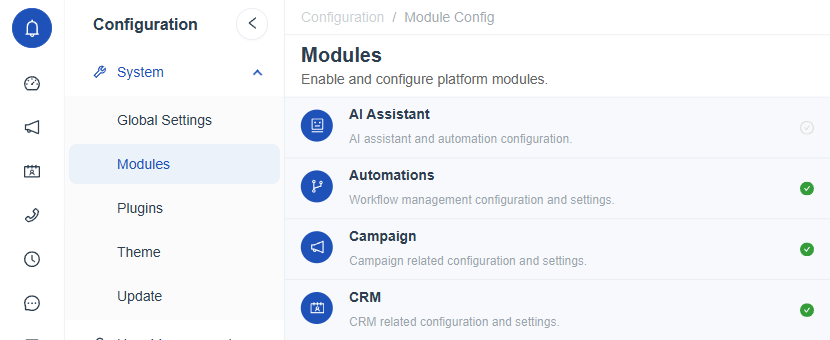
Figure 1. The System group of the Configuration menu, with its five pages: Global Settings, Modules, Plugins, Theme and Update.
The Five Areas
| Page | What it controls | Permission needed |
|---|---|---|
| Global Settings | Platform wide values such as phone format, time zone, one time password limits, file uploads, logging and export limits. | Global Configuration |
| Modules | Which product modules are on, and the settings of each one. | Module & Plugin Configuration |
| Plugins | The outside services the platform connects to, such as AI, speech, SMS, email, WhatsApp, directory sign in and telephony. | Module & Plugin Configuration |
| Theme | Logo, icon, background and primary color for the light and dark themes. | Theme Configuration |
| Update | Checking for new versions and applying one. | System Update |
Access to each page is granted per role. See Permissions.
A Sensible Order of Work
A sensible order is shown below. Each step has its own guide.
- Set the global values. Phone country code, time zone and the security limits in Regional Settings and Security and OTP Settings.
- Turn on the modules your organization needs. Review the list in Module Configuration Overview and adjust each module.
- Connect the outside services. Turn on and fill in the plugins in Plugin Configuration Overview.
- Apply your branding. Upload the logo and set the color in Brand Assets and Brand Colors.
- Keep the platform current. Use Checking for Updates regularly.
The modules and plugins that appear here depend on the license. The full list for an installation is shown on License Details.