Permissions
The twelve System Configuration permissions that a role can hold.
The System Configuration Group
Access to System Configuration is controlled by one group of twelve permissions on each role. Most are simple Yes or No switches. Audit Logs and Active Session also have a scope. The System Owner role has every permission. The Contact Center Supervisor role has a much smaller set of permissions.
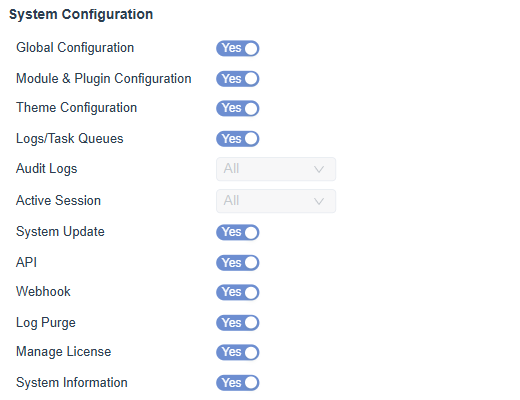
Figure 1. The System Configuration group of the System Owner role, with twelve permissions.
What Each Permission Allows
| Permission | Type | What it allows |
|---|---|---|
| Global Configuration | Yes or No | Open and change Global Settings. |
| Module & Plugin Configuration | Yes or No | Open and change Modules and Plugins. |
| Theme Configuration | Yes or No | Open and change the Theme. |
| Logs/Task Queues | Yes or No | View log files and task queues in Monitoring. |
| Audit Logs | Scope | View the audit trail. The scope limits which people appear. |
| Active Session | Scope | View signed in sessions. The scope limits which people appear. |
| System Update | Yes or No | Open the Update page and apply versions. |
| API | Yes or No | Use the platform API. |
| Webhook | Yes or No | Manage webhooks. |
| Log Purge | Yes or No | Purge log entries. |
| Manage License | Yes or No | Replace the license key and change the license. |
| System Information | Yes or No | View system information. |
info
The monitoring side of these permissions is described in Monitoring Permissions.
Grant or Remove a Permission
- Open Configuration, User Management, Roles.
- Select the role in the list.
- Open the System Configuration group. The group shows how many permissions are set.
- Switch each permission to Yes or No, and choose a scope where one is offered. Clear All switches every permission off.
- Save the role.
warning
Give Global Configuration, Module & Plugin Configuration and System Update only to the people who administer the platform. A wrong change affects every user.