Message Delivery and Logs
Messaging, Message Delivery and Logs
Find out whether a message left the platform and reached the customer.
Reading Delivery Ticks
Every message you send shows ticks beside its time in Conversations. They report the progress of the message.
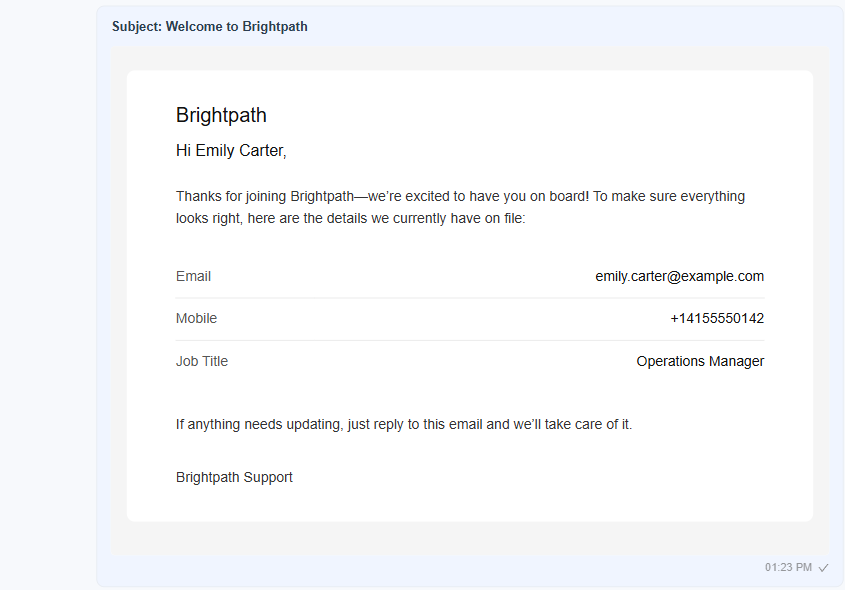
Figure 1. A sent email in Conversations. One tick beside the time shows that the platform recorded the message and handed it to the provider.
| Mark | Meaning |
|---|---|
| One tick | The platform recorded the message and handed it to the provider. |
| Two ticks | An update from the provider has been received for the message. |
| No ticks | The message was not recorded as sent. Check the provider settings and the logs. |
Delivery Updates from Providers
Delivery ticks depend on updates that the provider sends back to the platform. The Mailgun and WhatsApp plugins show a Webhook URL for this purpose.
- Open Configuration, System, Plugins and select the provider.
- Copy the Webhook URL at the bottom of the form. The copy icon beside it does this in one click.
- Paste it into the matching setting of your provider account. For Mailgun this is the webhook for delivery events. For WhatsApp it is the webhook of the Meta app.
- Send a test message and watch the ticks.
Info: Twilio SMS has a Call Back URL for the same purpose. See Twilio SMS.
Viewing Sent Messages
Two permissions control which sent messages you can see: View Sent Message for SMS and WhatsApp, and View Sent E–mail for email. Each has a scope of Own, Group or All. With scope Own you see what you sent. With Group you also see your group. With All you see everything. See Permissions.
Platform Logs
When a message fails before it reaches the provider, the reason is written to the platform logs.
- Open Monitoring, Logs.
- Open the log file for the time of the failure.
- Search for the provider name or the customer's address.
The Logs page requires the Logs and Task Queues permission. The System Configuration guides start at System Configuration Overview.
Tip: When a customer says they never received a message, check the ticks first, then the provider's own dashboard, then the platform logs.