Registry Health Check
Path: Monitoring → Automations → Registry Health Check
Registry Health Check inspects the integrity of the Trigger and Action catalog itself, platform wide, separate from any single workflow run. It confirms every module the system discovered is actually reachable, and that every saved workflow's nodes still point at triggers and actions that genuinely exist.
Opening Registry Health Check
- Go to Monitoring → Automations.
- Click the Registry Health Check tab. Sits beside Execution History, just under the page title. A Run Health Check button replaces the Purge button in the top right while this tab is open.
- Click Run Health Check to re-run the scan. Updates the Checked at time shown in the summary banner below.
Reading the Summary
- Read the banner at the top. States the overall finding in plain language, for example Stale Registry Configurations Detected, with a short explanation underneath.
- Read the four metric cards below it.
| Card | Means |
|---|---|
Discovered Modules | How many modules the Trigger and Action catalog found, shown as a count out of itself, for example 11 of 11. |
Healthy Modules | How many of those discovered modules are actually reachable right now. |
Schema Warnings | A count of modules whose schema looks stale compared to the live CRM field mappings, without being fully broken. |
Endpoint Errors | A count of modules that could not be reached at all. |
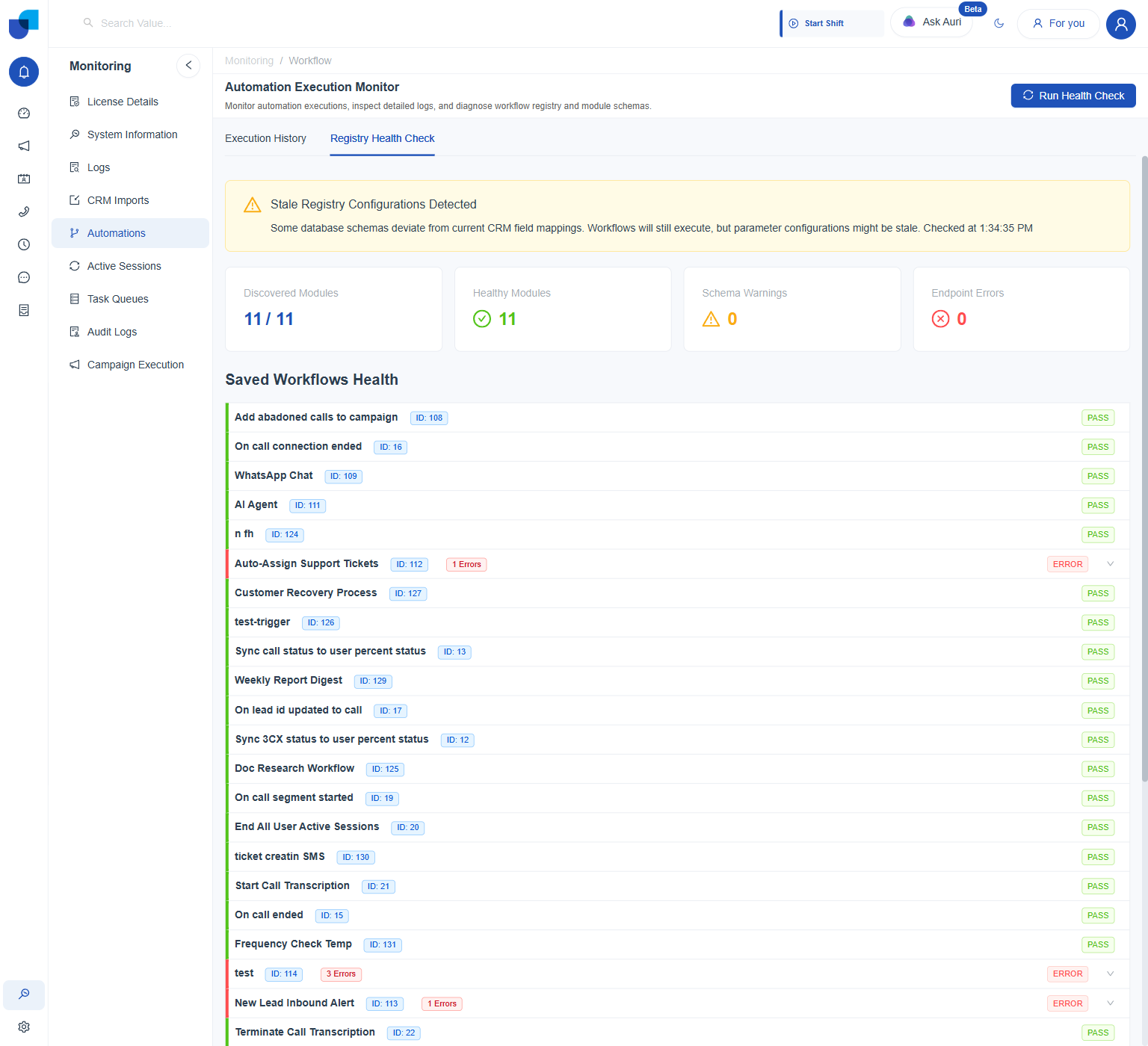
Figure 1. Registry Health Check: every module reachable, zero schema warnings, zero endpoint errors, yet the banner still flags stale configurations, which Saved Workflows Health below it explains.
Checking Saved Workflows Health
- Scroll to Saved Workflows Health.
Lists every saved workflow by name and ID, each marked
PASSorERROR. - Click an ERROR row to expand it. PASS rows are not expandable. Only rows marked ERROR, each also showing an error count badge such as 1 Errors, have the expand arrow.
- Read the exact error reason listed underneath.
A real example: workflow 113 shows ERROR with an unrecognized Trigger ID. Its edit panel still opens, but nothing shows as selected.
Checking Registered Module Configurations
- Scroll below Saved Workflows Health to Registered Module Configurations.
Lists every module the catalog discovered, by its internal key, with its own Actions and Triggers counts and a
PASSorERRORstatus.
| Module | Actions | Triggers |
|---|---|---|
campaign | 11 | 5 |
ai | 5 | 0 |
statusManagement | 10 | 6 |
messaging | 9 | 1 |
users | 7 | 8 |
groups | 4 | 5 |
calls | 9 | 10 |
edge | 3 | 0 |
emailProvider | 2 | 1 |
config | 6 | 0 |
integrations | 1 | 0 |
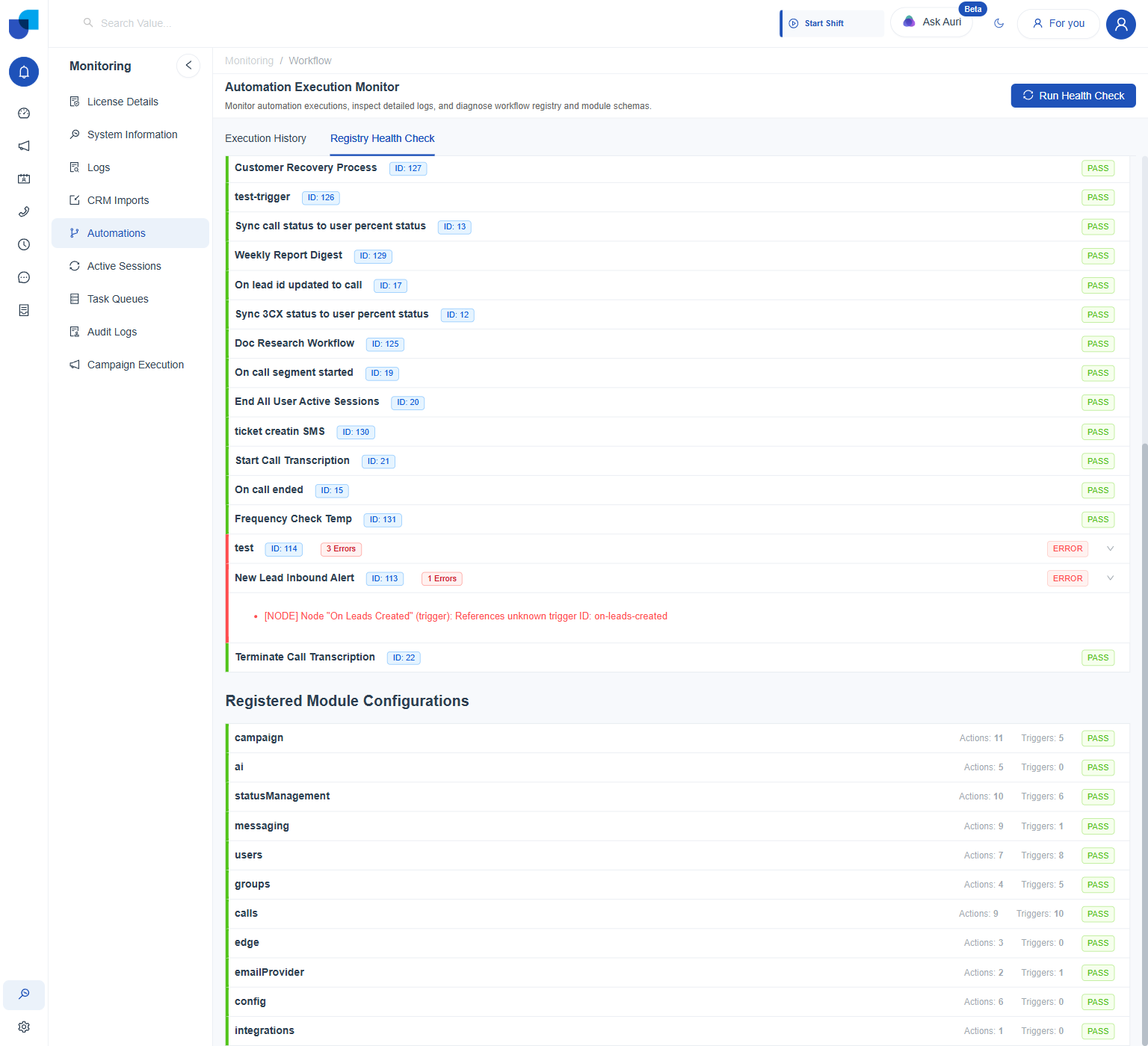
Figure 2. A real expanded error, directly above the start of Registered Module Configurations.
These are internal module keys, not Designer names. calls means Telephony here. CRM modules are counted separately, under their own categories.
Run Health Check before assuming a node editor is broken. A stale reference just leaves nothing selected there.