Backward Compatibility
Edge Softphone
How Compatibility Works
Edge and Uniconnect AI are released together, but an agent may connect to a tenant running an older Uniconnect AI. Edge handles this with a feature compatibility table in appsettings.json under FeatureMinimumVersions.
- Read the server version. At the URL step Edge reads the Uniconnect AI version and the licence type.
- Compare each feature. Every feature has a minimum Uniconnect AI version.
INITIALmeans always available. - Hide what is not supported. Buttons for unsupported features are hidden instead of failing.
Login Critical Features
When the Uniconnect AI version is too old for Edge, login is refused with "The Uniconnect AI version at this URL is not compatible with Edge Softphone. Update the Uniconnect AI version to continue."
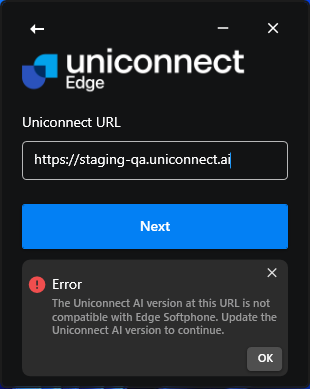
Figure 1. The version not compatible error at the URL step.
Store Updates
Edge compares its own version (AppUpdate:EdgeVersion) with the Uniconnect AI version. If Edge is older and the Microsoft Store has a newer package, Update available is offered once per Uniconnect AI version. Stand-alone installs do not receive this prompt.