Raise Hand
Edge Softphone
What Raise Hand Does
Raise Hand lets an agent silently ask for supervisor help without interrupting a call. It needs Uniconnect AI 1.3.0 or later. On older versions Edge hides the hand icon.
Raising and Lowering Your Hand
- Click the hand icon. It is in the header.
- Edge raises your hand in Uniconnect AI. The supervisor sees it. Edge shows a banner that reads "Waiting for supervisor".
- Click the hand again to lower it. If the supervisor lowers it, your banner clears as well.
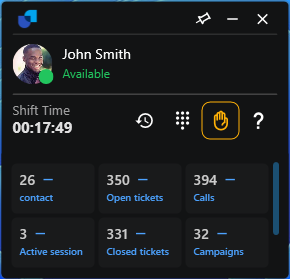
Figure 1. Raise Hand active, with the highlighted hand icon and the waiting banner.
How It Stays in Sync
- Real time. The state is synchronised over the WebSocket.
- Restored at login. If your hand is still raised when you log in, the waiting banner is shown again.
- Failures. If the request fails you see "Failed to toggle raise hand."