Settings
Edge Softphone
Opening Settings
Open Settings from the tray icon menu, or from the settings entry in the main window. The window has a left menu with Settings, Register, Diagnostics (Log Viewer, PBX IP Ping, Telnet) and About, plus Logout.
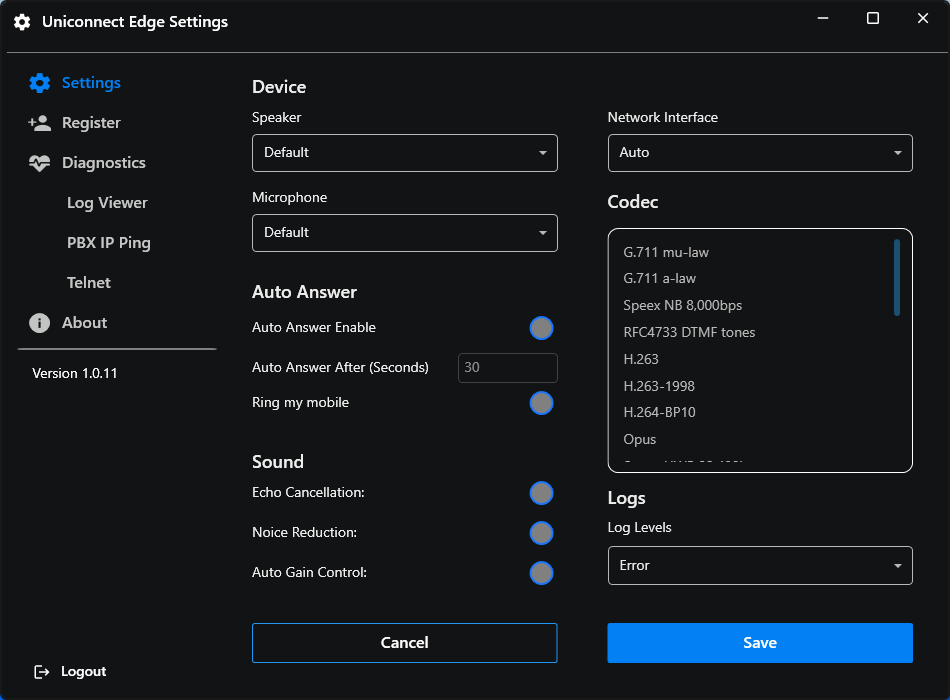
Figure 1. The Settings window.
Changes are saved to Uniconnect AI per user, so they follow the agent to another PC. After Save, a "Settings saved successfully" toast appears. The Save button is hidden if the Uniconnect AI version does not support UPDATE_USER_CONFIGURATION. Administrators set the defaults and locks in Uniconnect AI, and a locked setting cannot be changed in Edge.
SIP Registration
The Register page is a read-only view of the SIP account that Uniconnect AI provisioned from 3CX for the agent. It is the first place to look when the phone will not register.
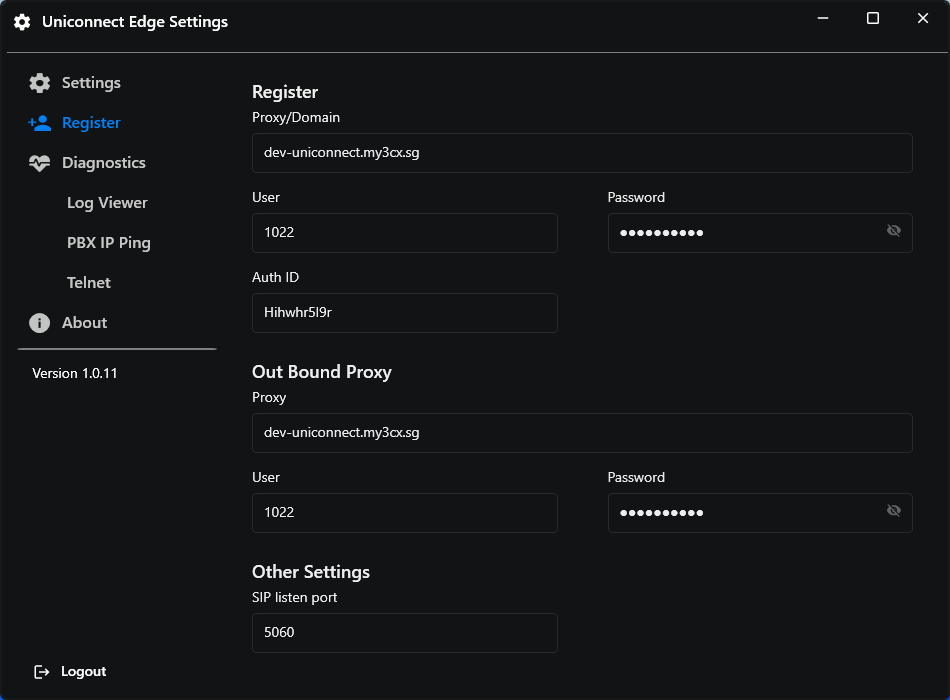
Figure 2. The Register page, a read-only view of the SIP account.
| Field | Meaning |
|---|---|
| Proxy / Domain | The 3CX registrar host. |
| User / Auth ID | The SIP user (extension) and authentication ID. |
| Password | The SIP password, masked. |
| Expire Time | The registration expiry and refresh interval, in seconds. |
| Out Bound Proxy / User | The outbound proxy and user. |
| SIP listen port | The local SIP port. |
The header shows the registration state: Connecting, Connecting (Attempt n/3), Registered (the status shows normally), Connection failed or Disconnected.
Audio Quality and Device Routing
The device, audio processing and codec options are on the main Settings page.
| Setting | Description |
|---|---|
| Device, Sound / Speaker | The playback device for call audio and ringing. |
| Device, Microphone | The recording device. |
| Network Interface | Which network card the SIP stack binds to. Auto is recommended. |
| Codec | The codec priority list. The administrator controls which codecs are available. |
| Echo Cancellation | Removes speaker echo. Recommended on. |
| Noise Reduction | Suppresses background noise. Recommended on. |
| Auto Gain Control | Normalises the microphone level. Recommended on. |
| Auto Answer, Auto Answer After (Seconds) | Answers incoming calls automatically after N seconds when no other call is active. The administrator may lock it (greyed out). Save checks that the seconds value is a positive number. |
| Ring my mobile | Also rings the agent's mobile on incoming calls. |
| Log Levels | SDK and application log detail: None, Fatal, Error, Warning, Information or Debug. |
- Hot plugging. Plugging in or removing a headset is detected automatically, and the device lists refresh.
- Avoiding echo. Choose the same headset for playback and microphone.
- Central changes. The administrator can push changed settings to the agent (
EnableForceUpdateSettings), and they are re-applied while Edge is running.
Network Handoff and Reconnecting
Edge continuously protects the registration and live calls against network changes such as Wi-Fi to Ethernet, VPN on or off, and sleep and resume.
Detection
- Every 5 seconds Edge checks that the 3CX registrar is reachable, with a 3 second timeout.
- A change of the active IPv4 addresses is detected with a 3 second debounce. Windows raises several events for one Wi-Fi switch, and only a real address change triggers action.
When the connection is lost
The status shows Disconnected (grey). Established calls are kept.
When it returns
The status shows Connecting, then one of these happens.
| Situation | What Edge does |
|---|---|
| Active or ringing call on the same IP | Refreshes the registration without restarting the SIP stack, so the call survives. Established calls are re-negotiated with a quick hold and resume to refresh media. If the call could not be saved and SIP is stuck, Edge performs a full network restart. |
| No call, or the IP changed | Restarts the SIP network layer. |
| Call state sync | Established calls are preserved. Ringing calls are kept after a brief drop, but cleared if the outage lasted more than 45 seconds. |
| PBX rejects registration | Edge retries up to 3 times (Connecting, Attempt n/3), then shows Connection failed. |
| Real time services | The WebSocket and the Cube dashboard and history reconnect automatically and re-subscribe. |
Manual retry
- Retry Connection. After a failure, use this button (tooltip Retry Connection Manually). It disables itself for 30 seconds, showing Connecting, so the PBX is not hammered.
- Retry Sync. If presence or status could not be fetched, this button fetches it again.