Edge Dashboard
Edge Softphone
What the Dashboard Shows
The dashboard shows KPI cards that the administrator configures in Uniconnect AI. It needs the Dashboard feature. Each card has a name, a value that updates in real time, and an up or down indicator compared with its previous value.
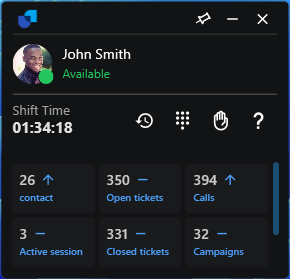
Figure 1. The KPI dashboard in Normal mode.
Normal and Docked Display
| Mode | Display |
|---|---|
| Normal | A scrollable grid of all cards under the header. |
| Docked | The first three cards inline. View all KPI cards expands the rest, and Collapse KPI Dashboard or Collapse Cards hides them. |
How the Cards Behave
- Order. Cards follow the administrator's
orderIndex. Adding, removing or re-ordering widgets in Uniconnect AI is reflected without restarting Edge. - Connection loss. If the connection is lost, the cards are cleared. They are re-established automatically when the network returns.
- Editing. Cards cannot be edited from Edge.
- Widget settings. The administrator defines each widget with a
widgetName, aquery, adataTypeand anorderIndexin Uniconnect AI.