Shift Handling
Edge Softphone
What a Shift Is
A shift is the agent's working session. SIP registration, presence and call handling are active only during a shift, so an agent who has logged in but not started a shift cannot take calls.
Starting a Shift
- Click Start Shift. The button is on the main window after login.
- Edge starts the shift in Uniconnect AI. If a shift already exists, Edge fetches it and resumes it.
- Edge initialises the SIP phone. It uses the provisioned 3CX registration.
- Edge opens the network path. The tunnel unblock is retried up to 5 times. If it keeps failing you see "Warning: Tunnel unblock failed. Some features may not work properly." and the shift still starts.
- Edge switches to the shift started view. It shows the Shift Time counter, the status and the KPI cards.
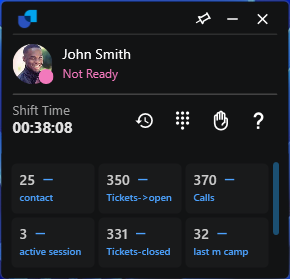
Figure 1. The shift started view.
Resuming After Being Offline
When Edge starts and an active shift exists, the time since you were last connected decides what happens. The administrator sets the two thresholds in Uniconnect AI.
| Time offline | Result |
|---|---|
| Less than auto_shift_resume_threshold | The shift is resumed silently. |
| Between the two thresholds | A prompt asks you to confirm your current activity. Choose Continue Shift to keep the original start time, or Start New Shift. |
| More than auto_shift_end_threshold | The old shift is treated as ended and a new shift is started. |
The prompt reads "You have been Offline for N minutes/hours. Please confirm your current activity."
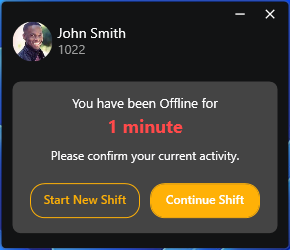
Figure 2. The offline prompt: Continue Shift or Start New Shift.
Ending a Shift
- Open the status menu. Click the status indicator and choose Shift End (shown in red).
- Confirm. A dialog shows the active shift time and asks "End your active shift?". Choose Stop shift & Exit, or Cancel.
- Edge ends the shift in Uniconnect AI. Presence becomes No Shift and the window returns to the Start Shift screen. If it was docked, it un-docks.
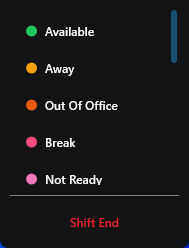
Figure 3. The status menu with Shift End.
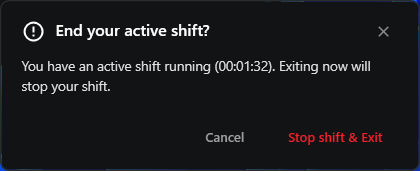
Figure 4. The end shift confirmation.
If a supervisor or the system ends the shift, the status becomes No Shift and Edge returns to the Start Shift screen automatically. Closing the window with X does not end the shift.