Contacts
Edge Softphone
How Contacts Work
Edge uses the tenant's Uniconnect AI contact directory, which needs the Contacts feature. There is no separate contacts window. Contacts show up in the places where they are useful, and the agent never edits them from Edge. If the Uniconnect AI version does not support Contacts, suggestions are hidden and numbers must be typed.
Where Contacts Appear
| Where | Behaviour |
|---|---|
| Dial pad search | Typing in Search Name or Number queries contacts by name or number. The search is debounced, and earlier requests are cancelled. Suggestions list the name, number or numbers and photo, and clicking one dials it. |
| Incoming, outgoing and connected calls | The remote number is looked up and replaced with the contact's name and photo when found. Otherwise the number is shown. |
| Call history | Each history row resolves the customer's name and photo, cached per number. |
| Presence | Contact availability dots reflect live status updates from the enterprise, subscribed in real time. |
Searching from the Dial Pad
- Open the dial pad. Use the dial pad icon in the header.
- Type a name or number. Matching contacts appear as suggestions under the box.
- Pick a contact. Click a suggestion to fill in the number, then press Call.
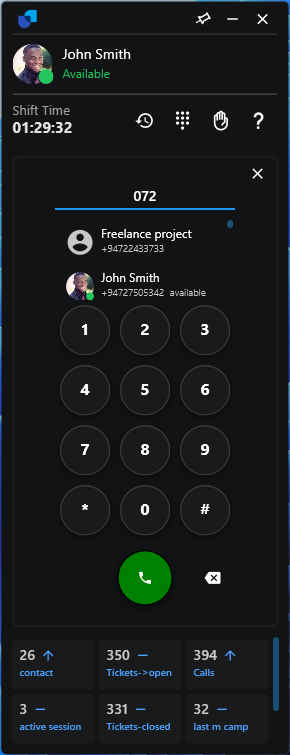
Figure 1. Contact suggestions in the dial pad.
A contact with several numbers appears once per number in the suggestions, so you can choose which number to dial. If a caller shows as a number, the contact is missing from Uniconnect AI.