Status Changes (Sync with Enterprise)
Edge Softphone
What Status Is
The coloured dot, status name and status menu under your avatar are your presence. It is shared with Uniconnect AI and 3CX. Changing it in Edge changes it everywhere, and changes made elsewhere appear in Edge within moments.
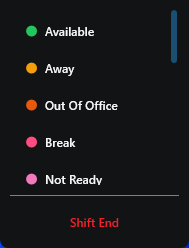
Figure 1. The status menu.
How Sync Works
| Direction or case | What happens |
|---|---|
| Edge to enterprise | Selecting a status sends it to Uniconnect AI, which updates 3CX. |
| Enterprise to Edge | CURRENT_STATUS events over the WebSocket update the dot, name, pending pill and break timer. Updates are ignored until SIP is registered, so the display never claims Available while the phone is offline. |
| Disconnected | If the enterprise reports Disconnected and SIP is not registered, Edge re-registers automatically. |
| No Shift | Returns Edge to the Start Shift screen. |
| After a network drop | The status is refreshed once connectivity returns. |