Call History
Edge Softphone
What Call History Shows
Open call history with the History (clock) icon in the header. History is delivered live from Uniconnect AI through Cube.js, so new calls appear without refreshing. It needs the Call History feature. After a network drop the subscription is restored automatically.
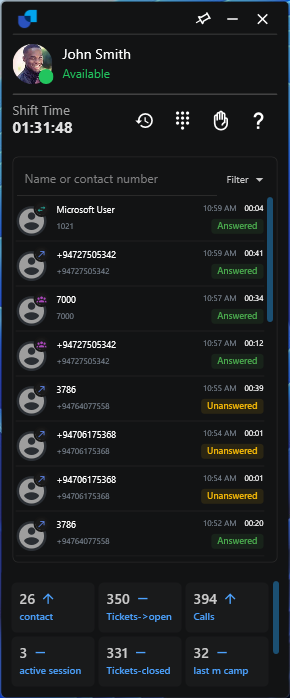
Figure 1. The call history list, with search and filters.
Records load 10 at a time. Scroll to the end of the list to load more. When the filters match nothing, Edge shows "No calls found".
Searching and Filtering
- Search. Type a name or contact number in the search box.
- Choose a call type. Use the CALL TYPE checkboxes to narrow the list.
- Choose a status. Use the STATUS checkboxes to narrow it further.
| Filter group | Options |
|---|---|
| CALL TYPE | All, Inbound, Outbound, Internal. |
| STATUS | All, Answered, Unanswered, Abandoned. |
Calling Back
Click the number in a row to copy it into the dial pad, then press Call. The customer's name and photo are resolved for each row and cached per number.
Call Statuses
In-progress calls (dialing, ringing, talking) are not listed. They appear when they finish, with their final status: Answered, Unanswered, Voicemail, Abandoned, Failed, Agent Rejected, DNC or Already Call Back.