Using APIs in Workflows
A saved API can also be called from a workflow, without a CRM module. The workflow action is named Execute API Request, and it belongs to the Integrations group of actions. In the example, a workflow could look up a customer in PolicyHub KYC whenever a new lead is created. How workflows are built is covered in the Automations documentation. See Workflow Builder. This page covers only the Execute API Request action.
Adding the Action
- Open the workflow in Configuration → Automation.
- Add an Action node and open its editor. The Edit action Node panel opens with a list of actions and a search box.
- Search for API and choose Execute API Request. Its description reads Execute a saved API request from a collection.
- Choose the collection under Select Collection.
- Choose the API under Select Request. Each variable of the API appears as an input. For Get Customer, an input named customerId appears.
- Fill in the variables and the optional settings, then click Save.
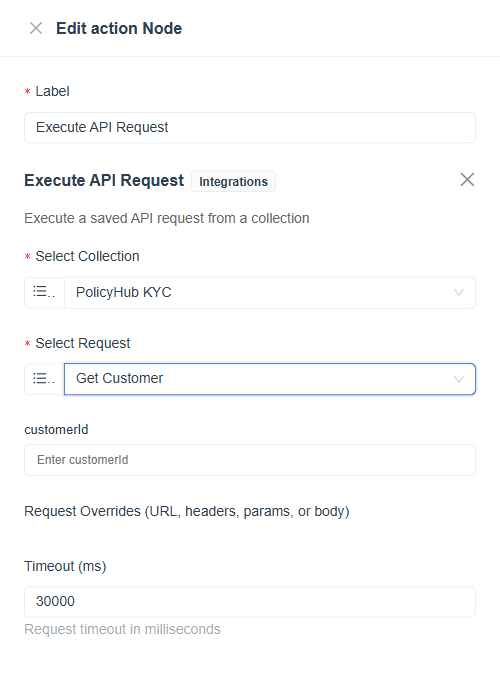
Figure 1. The Execute API Request action configured with the PolicyHub KYC collection and the Get Customer request. The customerId input comes from the API's variable.
Settings
| Setting | Purpose |
|---|---|
| Select Collection | The collection that holds the API. |
| Select Request | The saved API to run. |
| Variable inputs | One input for each variable of the API. They can take a value from an earlier step of the workflow. See Variables. |
| Request Overrides | Optional changes to the URL, headers, parameters or body for this call only. |
| Timeout (ms) | How long to wait for the outside system, in milliseconds. The default is 30000. |
The result of the call is available to the steps that follow, so a Condition or an Update action can use the data that came back.
Set a shorter timeout for lookups that should not hold up the workflow, and add a Condition after the action to handle a failed call.