Status Management with 3CX
What It Controls
Status Management, under Configuration → Status Management, defines the presence statuses an agent can be in, such as Available, Away, Talking or Lunch, and what each one does to that agent's 3CX call handling. Marcus Webb, extension 1018, switches between these statuses through his shift. The Call Handling behavior is the part specific to Telephony.
The Built In Statuses
Each status in the list shows a short summary of its call handling beneath its name: External Calls, Queue logged in or out, and Ring My Mobile.
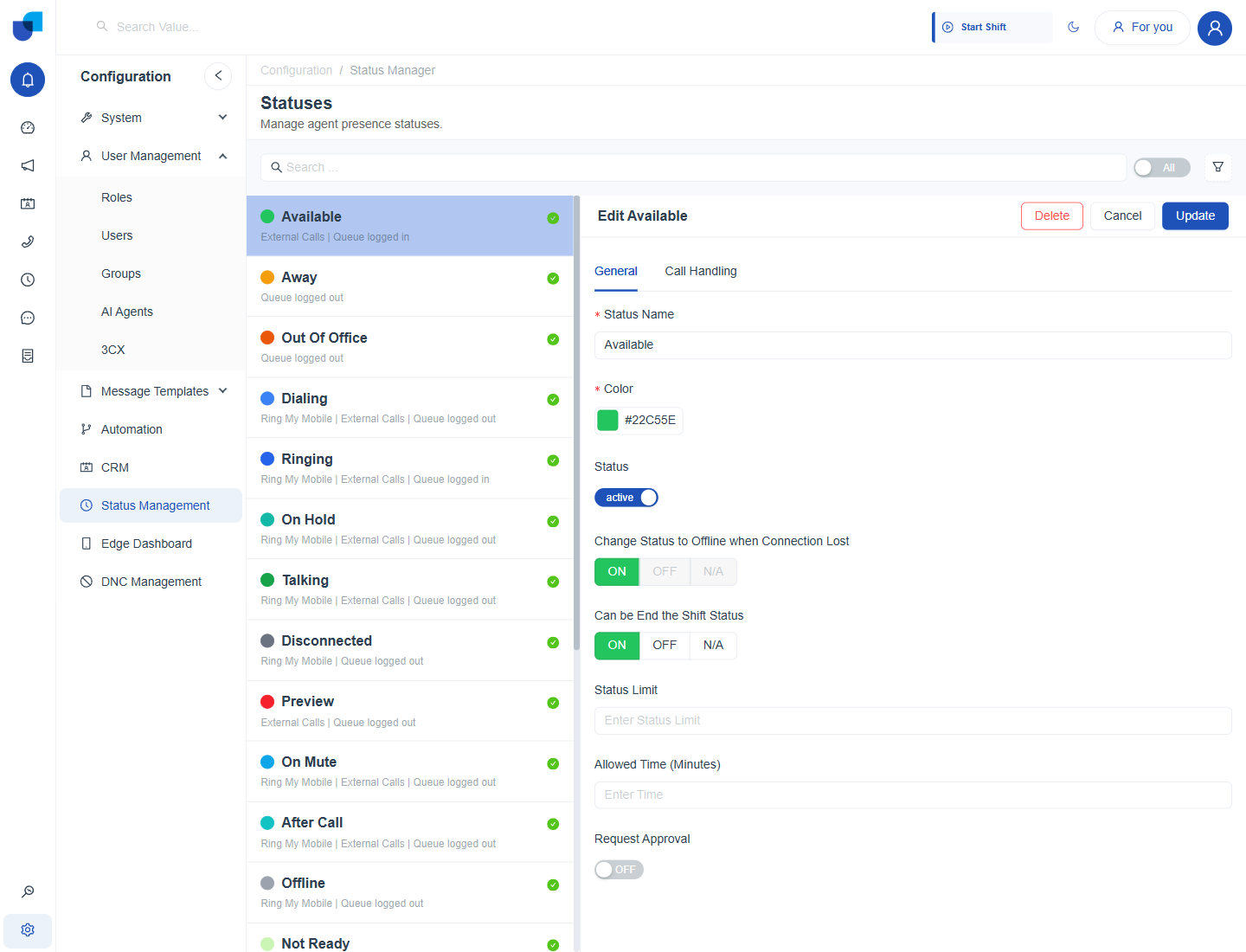
Figure 1. The Statuses screen with the Available status open, showing its General tab beside the list of statuses.
| Status | Call handling |
|---|---|
| Available | External Calls on, Queue logged in. |
| Away / Out Of Office / Not Ready | Queue logged out. |
| Dialing / On Hold / Talking / On Mute / After Call | Ring My Mobile, External Calls on, Queue logged out. |
| Ringing | Ring My Mobile, External Calls on, Queue logged in. |
| Disconnected / Offline | Ring My Mobile, Queue logged out. |
| Preview / Outbound / Connecting | External Calls on, Queue logged out. |
| Lunch / Tea Break / AUX Break / Washroom Break / Other Break | External Calls on, Queue logged out. |
Call related statuses such as Dialing, Ringing, Talking and On Hold are applied by the platform as a call progresses, through the system workflows described in System Workflows Telephony. Break statuses are chosen by the agent.
The General Tab
Opening a status shows two tabs. General holds the settings shared by every module that shows agent presence.
| Setting | Meaning |
|---|---|
| Status Name | The name agents see in the presence menu. |
| Color | The color shown for the status, entered as a color code. |
| Status | Active or inactive. An inactive status is not offered to agents. |
| Change Status to Offline when Connection Lost | On, Off or N/A. Moves the agent to Offline if their connection drops. |
| Can be End the Shift Status | On, Off or N/A. Marks the status as one in which the shift can be ended. |
| Status Limit: Allowed Time (Minutes) | How long an agent may stay in the status, in minutes. |
| Request Approval | On, Off or N/A. Requires approval when the agent asks to use the status. |
The Call Handling Tab
Call Handling is the tab that reaches into 3CX. Three independent controls decide what the agent's extension can do while in the status.
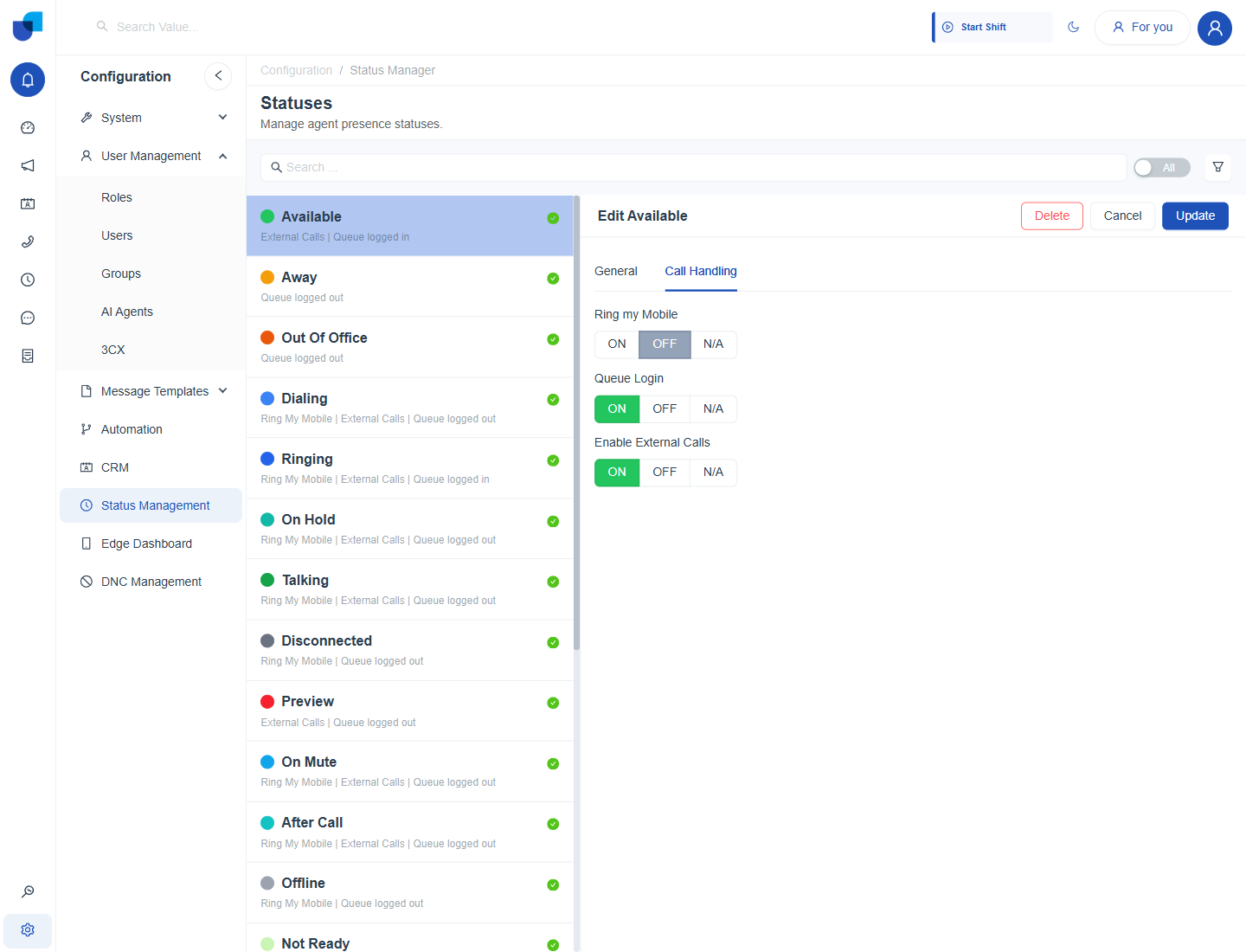
Figure 2. The Call Handling tab of a status, with three independent On, Off or N/A controls.
| Control | Meaning |
|---|---|
| Ring my Mobile | When On, a call to the extension also rings the agent's mobile number, the same number synced in 3CX User Sync. |
| Queue Login | When On, the agent is logged in to their queues and eligible for queued calls while in this status. |
| Enable External Calls | When On, the agent can place and receive external calls in this status. |
Each control is its own On, Off or N/A choice, so a custom status can mix them. For example, a Training status can keep Queue Login off while External Calls stays on, so the agent can still make outbound calls.
Sync with 3CX
Presence synchronization is on by default after the integration is connected. An agent can change status in UNICONNECT AI or in UNICONNECT AI Edge, and the change is reflected in 3CX without opening a 3CX client.
Not every status in either system maps to a status in the other. The mapping depends on the configuration of both, so check the statuses used in 3CX against the ones defined here before relying on the sync.
Where This Fits
The General tab is shared across the platform. Call Handling is the tab that ties a presence status to what the connected 3CX server lets the extension do. How an agent starts and ends a shift is in Telephony Getting Started.